Maya: A Whimsical Display Font for Eye-Catching Campaigns
Maya for Social Media Graphics and Brand Teasers
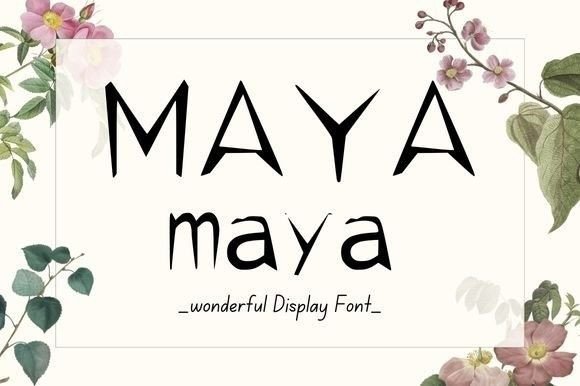
Maya is a fun and whimsical display font that brings a playful energy to any design. I first encountered it while preparing a product launch graphic for a seasonal sale campaign. The challenge was to create something that stood out on Instagram and Pinterest, where visual competition is fierce. Maya’s quirky personality fit perfectly with the brand’s youthful tone, making headlines pop without feeling too loud or overwhelming.
When designing the Instagram post, I used Maya for the main headline, “Get Ready for the Season’s Best Deals,” and paired it with a clean sans serif font for supporting text. This combination gave the post a balanced look—playful yet professional. On mobile screens, the font remained legible even when scaled down, which is crucial for fast-scrolling feeds.
Maya in YouTube Thumbnails and Reels Covers
Next, I tested Maya for a YouTube thumbnail set for a course launch. The goal was to capture attention quickly since viewers often skip past unappealing thumbnails. I used Maya for the title, “Unlock Your Creativity Today,” and layered it over a bright, colorful background. The result was a thumbnail that felt inviting and memorable, especially when compared to more traditional, corporate-style designs.
The font’s unique curves and slightly irregular letterforms helped differentiate the video from others in the same category. It also worked well as a callout in the corner of the thumbnail, reinforcing the message without cluttering the design. For reels covers, I applied Maya to short, punchy phrases like “Think Outside the Box” and found that it added just the right amount of character to make the content feel fresh and engaging.
Maya for Email Banners and Digital Ads
When building an email promotion for the same campaign, I wanted a header that would stand out in the inbox but still be easy to read. Maya was the perfect choice for the subject line banner, “Don’t Miss Out on Our Limited-Time Offer.” The font’s whimsical nature aligned with the brand’s voice, and its boldness ensured it caught the eye even among a sea of other emails.
In digital ads, I experimented with using Maya for the headline in a Google Display Network ad. The phrase “New Arrivals Just Dropped” in Maya immediately drew attention, especially on websites with a creative or lifestyle focus. However, I made sure to keep the body copy in a more readable sans serif font to maintain clarity and avoid confusing the audience with too much stylistic flair.
Maya in Webinar Banners and Course Launches
For a webinar banner promoting an online course, I needed a title that conveyed both excitement and credibility. Maya was ideal for the headline “Master the Art of Design in 7 Days.” Its quirky charm softened the educational tone of the event, making it feel more approachable and less intimidating.
I also used Maya for decorative titles within the course landing page, such as “What You’ll Learn” and “Meet Your Instructor.” These elements added visual interest without distracting from the core message. Pairing Maya with a modern sans serif font for subheadings created a cohesive and polished look that resonated with the target audience.
Readability and Practical Tips for Using Maya
While Maya excels in short, impactful statements, it’s important to consider readability across different platforms. On dark backgrounds, I recommend using a light stroke or outline to ensure the text remains visible. For small previews like app icons or thumbnails, keeping the text concise and avoiding overly complex characters is key.
Maya works best in situations where the goal is to create a strong first impression, such as headlines, callouts, and decorative titles. It may not be suitable for long-form copy or formal documents due to its stylized appearance. Before using Maya in client campaigns or commercial projects, always check the licensing terms and ensure you have access to all necessary styles, alternates, and multilingual support.
Font pairing is another consideration. Maya pairs beautifully with clean sans serifs like Helvetica or Arial for contrast, or with script fonts for a more handcrafted feel. Experimenting with these combinations can help you find the right balance between creativity and readability in your designs.